Free podcast recording software: the $0 stack that actually holds up
Every recorder below costs nothing. What each one charges instead is a cap, a watermark or a track limit, and the trick is choosing the one whose ceiling sits above your show.
The short answer
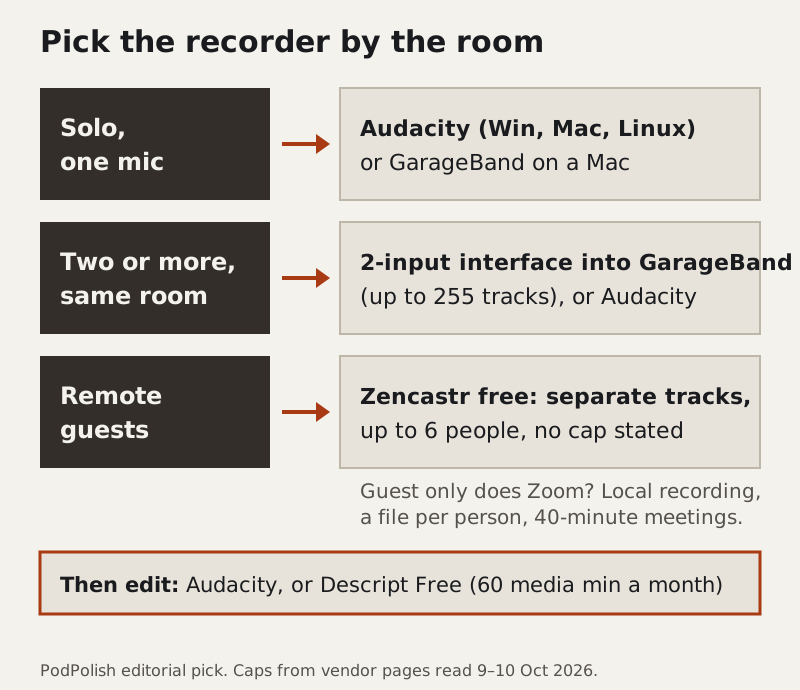
Record solo shows in Audacity, an open-source recorder that costs nothing and runs on Windows, macOS and Linux, or in GarageBand if you're on a Mac. For remote interviews, Zencastr's free tier is the most generous recorder we found: separate audio and video tracks with no recording cap stated, up to 6 participants and 48 kHz WAV, as of 10 Oct 2026. Zoom's free plan records too, a separate file per person if you switch it on, but every meeting stops at 40 minutes. Edit in Audacity, or try Descript Free if editing by transcript suits you, inside its 60 media minutes a month.
This page is for anyone starting a show without a budget, or checking whether a paid recorder is buying them anything. Skip it if you already publish a weekly hour-long video show with guests: you'll hit the watermark and resolution limits on most free tiers in week one, and the "Where free stops" section is the part to read.
The stack, assembled by setup
The right free recorder depends less on the software than on where the voices are. Three setups cover nearly every podcast we hear about.
Solo, one mic
Audacity is the default for a reason. It's free, open source and on version 4.0.1 as of 9 Oct 2026, and it runs on all three desktop systems. For a single voice, set the project to mono and record the raw take as uncompressed audio; every cleanup tool downstream does better with a file that hasn't been squeezed into an MP3 yet. The learning curve for recording alone is short: pick the input, watch the meter, press record.
On a Mac, GarageBand does the same job at the same price. The App Store lists it as free and, on the listing we read, it needs macOS 15.6 or later. It's built for music, so the podcast parts are hidden among drummers and amp models, but a voice track is a voice track, and the editing is gentler than Audacity's for a first show.
Two or more people, same room
Two voices need two microphones, and two microphones need an audio interface with two inputs, because a laptop has one. That's the one hardware cost in this guide, and it's why the same-room setup is the hardest to do for nothing. With the interface in place, the software is still free. GarageBand handles up to 255 tracks according to Apple, so put each input on its own track and you can fix one person's cough without touching the other. Audacity can take a two-input interface as a stereo recording, one voice on each side, which you split into two mono tracks before editing.
Don't skip the separate tracks. One mixed file of two people means every edit cuts both voices, and noise cleanup can't treat a loud guest and a quiet host differently.
Remote guests
This is where free tools differ most, and where the next two sections spend their time. The short version: Zencastr free if your guest can open a browser link, Zoom local recording if they'll only use Zoom, and Riverside's free tier if you want to try a polished studio for one or two interviews before paying.
Receipts: caps, watermarks, track limits
Every figure below was read on the vendor's own page, in the US, on the date shown. A free tier is only as useful as its smallest number, so that's the column to read first.
| Tool | What the free tier allows | Separate tracks | Watermark / quality | Paid entry |
|---|---|---|---|---|
| Audacity | No cap; free and open source (Win, Mac, Linux) | Yes, by track or channel | None; your own file | No paid tier |
| GarageBand (Mac) | No cap; free on the App Store, macOS 15.6+ | Yes, up to 255 tracks | None; your own file | No paid tier |
| OBS Studio | No cap; free and open source | Depends on your audio routing | None; your own file | No paid tier |
| Zoom Basic | 40 minutes per meeting; local recording only | Yes, if "separate audio file for each participant" is on | Zoom's own audio processing unless you change it | Not covered here |
| Zencastr free ("Vibecastr") | Separate-track recording with no cap stated; up to 6 participants; 4 seats; up to 5 shows | Yes, unlimited | 48 kHz WAV; up to 4K video; page lists "Customize watermark" but doesn't say exports are watermark-free | Enterprise only (custom) |
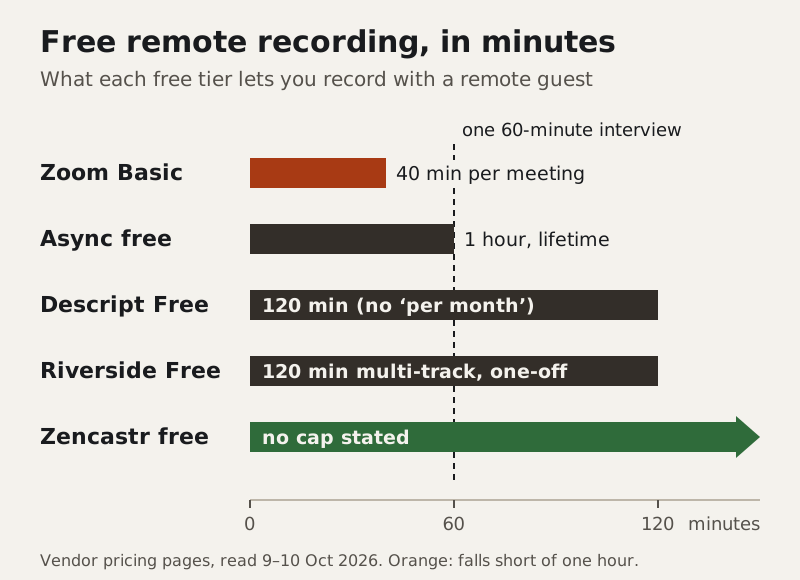
| Riverside Free | "Try 2 hours" of multi-track; unlimited single-track | 2 hours, one-off | Riverside watermark; up to 720p; 44.1 kHz audio | Pro $288 a year, billed annually |
| Descript Free | 60 media minutes a month per editor; Rooms recording listed as 2 hours with no "per month" | Yes, in Rooms | Export up to 720p; watermark-free export is listed for paid plans | Paid prices not verified (omitted) |
| Async free | 1 hour of remote recording, lifetime | Not stated | Export up to 720p video or 160 kbps MP3 | Essentials $11.99 a month, yearly view |
A few receipts need a sentence more than a table cell allows.
Riverside's two hours are a sampler. The free column says "Try 2 hours" of multi-track recording, and single-track recording is unlimited. Single-track means one mixed file, the thing we just told you to avoid. Two hours of separate tracks is two or three interviews to decide whether you like the studio. Pro, billed annually at $288 a year, removes the watermark, records 48 kHz audio and includes 15 hours of separate-track downloads a month.
Descript's free allowance is two numbers. Media minutes (60 a month per editor) count everything you import or record into Descript. Rooms, its remote recorder, lists 2 hours for Free, but the paid columns say "per month" and the free one doesn't, so treat it as a trial allowance. In practice, one hour-long interview uses the month's media minutes before you've edited anything else.
Async moved its plans around. The company formerly known as Podcastle now sells mainly AI video tools, and its free tier is a set of lifetime allowances, including one hour of remote recording. It's a test drive, not a home.
Zoom isn't a podcast tool, but it's the one your guest already has. The Basic tier's 40-minute meeting limit is the receipt that matters. Local recording is available on free accounts in the desktop app, which is enough.
Remote guests on a $0 budget
A remote interview is two problems: getting each voice onto its own track, and keeping each voice clean at the source. Free tools solve the first well and the second only partly.
Zencastr free is the straight answer for most shows. Your guest gets a link, each participant is recorded as a separate track, and the pricing page lists local recording with progressive uploading, which is how a remote recorder avoids capturing the guest's voice after it's been squeezed through the call. The free tier is called Vibecastr, and the only other tier on the page is Enterprise.
Zoom, set up properly, is the fallback when a guest won't install or open anything new. Two settings matter. In the desktop app, click your profile picture, open Settings, choose Recording and turn on "Record a separate audio file for each participant." Then, in the meeting, open the arrow next to Audio, choose Microphone modes and pick Original sound for musicians, so Zoom stops treating your voices like a conference line. Leave echo cancellation on unless both of you wear headphones. Our Zoom recording guide walks every toggle.
The catch is the clock. A free Zoom meeting ends at 40 minutes, so an hour-long interview means a planned break, a second meeting and two sets of files to join in the edit. Put the break at a natural topic change and say so on the call; listeners never hear the seam if you plan it.
The noisy-guest problem is what free recorders can't fix. Separate tracks let you clean each voice afterwards, but audio recorded clean always beats audio repaired. If you're the one calling from a noisy room, Krisp cleans your microphone live on a Mac (macOS 14 or later) or Windows 10 or 11 PC. Krisp has no $0 tier. Its trial runs seven days without asking for a card, and Core then bills $8 a month on an annual plan (as of 9 Oct 2026). Our Krisp interview workflow covers when it's worth paying for, and the remote recording guide covers the rest of the setup.
Where free stops (what free recording can't buy)
Free recording holds up for audio podcasts. It's video, volume and convenience where the ceilings start to bite.
- Video quality and branding. Riverside Free, Descript Free and Async free all cap video exports at 720p, and Riverside stamps its watermark on free exports. If your show lives on YouTube, that's the first wall you'll hit.
- Refills. Most free remote allowances are one-off or lifetime: Riverside's two hours, Async's one hour, and Descript's Rooms hours as listed. Only Zoom's limit resets, and only because it's a per-meeting limit.
- Editing time. Descript's 60 media minutes a month is less than one episode's raw recording on our cost worksheet's assumption of about 90 raw minutes per episode, let alone a month of shows. Audacity has no cap, but you pay in hours at the desk.
- A quiet room. No recorder removes the dishwasher. That's the job of the twenty-minute recording setup guide, which is free too.
Most people who outgrow the $0 stack do it at the edit, not the recorder. If editing by transcript clicks for you inside Descript's 60 free media minutes, that's the point to look at its paid plans; our Descript Studio Sound workflow and the cost worksheet put the monthly bill against your episode count.
Edge cases
Chromebook or Linux. Audacity runs on Linux. Zencastr lists web and iOS apps, so a guest on a Chromebook can join from the browser. Krisp doesn't run on Linux or ChromeOS.
Phone only. You can record a solo show on an iPhone; our iPhone recording guide covers it. For a remote guest who only has a phone, Zencastr's iOS app is the free route we'd try first.
Video podcasts. Zencastr's free tier lists up to 4K video. OBS Studio is free and open source for recording your own camera and screen, version 32 or later at the time of writing. The free tiers of Riverside, Descript and Async top out at 720p.
More than six people. Zencastr free records up to 6 participants. A panel bigger than that is past what we'd trust a free tier with.
Guests on a different continent. Recorders that upload each guest's local recording progressively protect you from a bad connection, because the track you edit was recorded on the guest's machine, not received over the call. That's the main reason to prefer a remote recorder over Zoom when a guest's internet is shaky.
Before you hit record: the $0 stack checklist
- Audacity or GarageBand set to mono for a single voice; record uncompressed
- Remote: Zencastr link sent, or Zoom's separate-audio-file setting on and Original sound on
- A planned break before minute 40 if you're on free Zoom
- Phones silent, notifications off, fan off, door closed
- A ten-second test take, played back on headphones, before the real one
Asked at the bench
- What's the best free podcast recording software?
- Audacity for a solo show on any computer, GarageBand on a Mac, and Zencastr's free tier for remote guests, since it records separate tracks with no cap stated and up to 6 people, as of 10 Oct 2026.
- Is there free podcast software with no time limit?
- Yes. Audacity, GarageBand and OBS Studio record locally with no cap. For remote interviews, Zencastr's free tier states no recording cap. Zoom's Basic tier stops each meeting at 40 minutes, and Riverside's free tier gives 2 hours of multi-track recording once.
- Can I record a podcast on Zoom for free?
- Yes. Free accounts can record locally in the Zoom desktop app, and a setting saves a separate audio file for each participant. The limit is 40 minutes per meeting on the Basic tier.
- Does free podcast recording software add a watermark?
- Audacity, GarageBand and OBS don't, because the file is yours from the start. Riverside's free tier adds its watermark, and Descript lists watermark-free export on its paid plans. Free video exports from Riverside, Descript and Async top out at 720p.
- Can I make a podcast entirely free?
- In software, yes: record in Audacity or Zencastr, clean up in Adobe Podcast Enhance (its free tier enhances an hour of audio a day), edit in Audacity and publish. What's left is a microphone, an interface if two of you share a room, and your time.