Podcast Mic Bleed: Two Hosts, One Room, and How to Stop the Echo
Your co-host's voice in your mic, a few milliseconds late. Where bleed comes from, what fixes it at record time, and what the edit can still do.
Mic bleed is your co-host's voice arriving in your microphone as well as their own, a fraction of a second later and with more of the room on it. Mix the two tracks and every word plays twice, slightly out of step, which listeners hear as echo or a hollow, distant sound. The fix starts before you press record: get each mic much closer to its own speaker than to anyone else, point the mics away from each other, and treat the room. After that, the edit can do the rest. A noise gate can drop each track while its speaker is silent, and Auphonic's multitrack processing has a Remove Mic Bleed step built for exactly this. What no tool can do well is rescue two omni mics on a table between four people.
This worksheet is for shows recorded with two or more people in one room on separate mics, each on its own track. If you record everyone on one mic, there is no bleed to remove; the problem there is balance. Vendor details below were read on 18 Oct 2026.
Where bleed comes from, in one minute
Every open microphone in a room picks up every voice in it. The only question is how loud the wrong voice is compared with the right one. Auphonic's help pages describe the result plainly: when several people are recorded on several microphones in one room, speaker one's voice is also recorded on speaker two's mic, and that bleed, also called spill or crosstalk, gives the final mix a reverb or echo-like effect.
Distance decides most of it. HyperPhysics, the physics reference from Georgia State University, sets out the inverse square law: from a point source with no reflections, sound intensity falls with the square of distance. In decibels, every doubling of distance costs about 6 dB. So the gap between your voice and your co-host's voice in your mic depends on the ratio of their distances from it, not on how loud either of you talks.
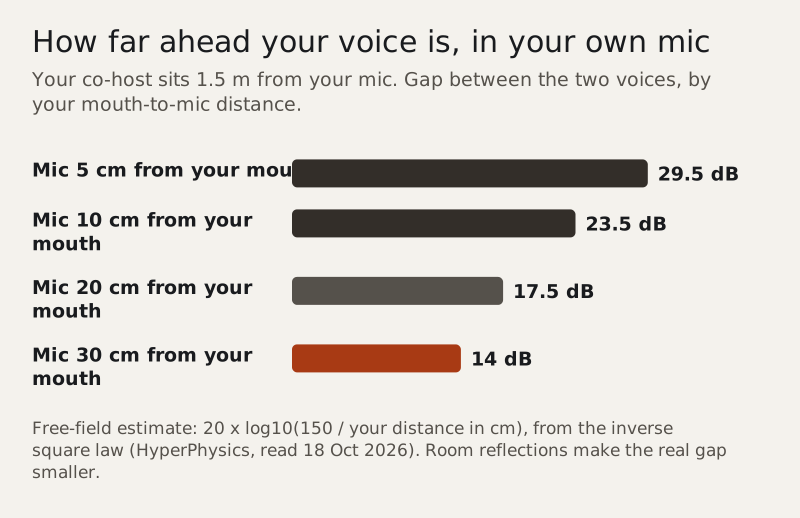
The chart is a best case, since it ignores the room, but the shape holds. Moving your mic from 30 cm to 10 cm from your mouth widens the gap by about 10 dB without touching anything else. Spreading hosts further apart helps too, though less: doubling the distance between you buys about 6 dB.
Fix it at the mic, before the edit
Every decibel you win here is one the edit does not have to fake. These are the moves, roughly in order of what they cost.
- Bring each mic close to its speaker's mouth and keep it there. A boom arm that holds position beats a desk stand.
- Point the mics away from each other. Seat hosts so that each mic's back faces the other person.
- Lower the input gain once the mics are closer. Less gain means less room and less of your co-host.
- Spread out. Every doubling of the distance between hosts is worth about 6 dB on paper.
- Soften the room: rugs, curtains and a sofa reduce the reflected copy of each voice that every mic collects.
- Agree a no-talking-over rule for the important bits. Overlapping speech is the hardest bleed to clean.
Dynamic mics are often recommended for shared rooms because they are typically used close to the mouth, and the closeness is what does the work. A condenser used close, with the room softened, can behave well; a dynamic mic left at arm's length will not. Our podcast mic noise guide compares the types in a noisy room.
Fix it in the edit: three routes
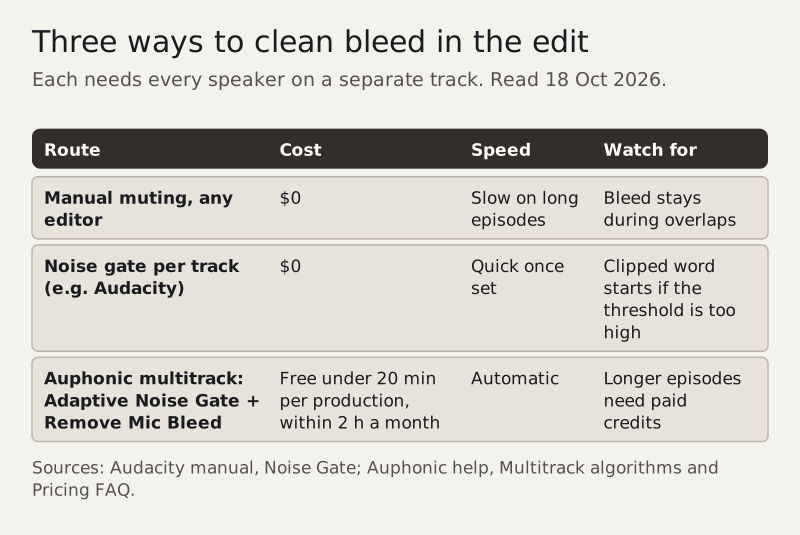
Once the session is recorded on separate tracks, three routes remain, from free and manual to automatic.
Manual muting
Go through each track and cut or lower it wherever its owner is silent. It is free in any editor and completely predictable, and on a long episode with quick back-and-forth it is slow. It also leaves the bleed in place during overlaps, because both tracks are live.
A noise gate per track
A gate closes a track when the level falls below a threshold and opens it when its speaker talks. Audacity's Noise Gate has the controls you need: a threshold, a level reduction (at -100 dB a closed gate silences the track completely), and attack, hold and decay times. Its attack can look ahead, so the gate starts opening before a word crosses the threshold, which helps avoid clipping the first syllable. Set it by ear on a passage where both hosts talk, and use the Preview button often; the manual itself recommends that.
The weakness is the one Auphonic points out: bleed can be loud, so a threshold that keeps your co-host out of your track may also cut your quieter words. Leave the level reduction gentler than -100 dB if the result sounds choppy.
Auphonic multitrack
Auphonic's multitrack mode takes each speaker's track as a separate file, analyses them together and mixes them. Its help pages describe two steps that matter here. The Adaptive Noise Gate lowers each track where its speaker is inactive, with the gate settings chosen automatically because Auphonic's classifiers know who is speaking when. Remove Mic Bleed goes further: it removes the same or correlated signal from the other tracks, which Auphonic says gives a more direct sound with less ambience and reverb.
On cost, Auphonic Free covers 2 hours of processed audio a month, and its pricing FAQ says non-paying users can try the multitrack algorithms on productions shorter than 20 minutes. Longer multitrack episodes need recurring or one-time credits. Credits are charged on the length of the output file, so a 1-hour, 4-track episode uses 1 hour.
When to stop fighting it
Sometimes the cheapest fix is a different recording plan. If the room is bare and hard, the hosts cannot sit apart, and the gate keeps cutting words, record from separate rooms instead, each person on their own laptop and headphones. That turns a bleed problem into a remote recording problem, which is a better-understood one; our guide to recording a podcast remotely covers it.
Edge cases
Video podcasts
Gating and muting change the audio only, but a camera still shows a host talking on a muted track during overlaps. Check overlaps against the picture before you export.
Three or more hosts
Bleed adds up with every extra open mic. Gates, or Auphonic's multitrack processing, become close to mandatory once three or more mics are live in one room.
One USB mic per person on one computer
Some setups record several USB mics into one session. Each mic still needs its own track for any of the edit routes to work, so check that your recorder keeps them separate before the guests arrive.
Laughter and crosstalk
Overlapping speech defeats simple gates, because both tracks are open at once. That is where bleed survives every method, so keep the mics close for the moments you expect to talk over each other.
Questions we get
What is mic bleed in a podcast?
It is one speaker's voice being picked up by another speaker's microphone in the same room. When the tracks are mixed, each word arrives twice, a little apart, and the result sounds echoey or distant.
How do I stop mic bleed when recording a podcast?
Put each mic close to its own speaker, angle the mics away from each other, lower the gain, spread hosts apart and soften the room. By the inverse square law, every doubling of distance cuts the level by about 6 dB.
Can you remove mic bleed after recording?
Partly, if each person is on a separate track. Manual muting and a noise gate remove it when a speaker is silent. Auphonic's multitrack Remove Mic Bleed removes correlated signal across tracks automatically.
Does a noise gate fix podcast mic bleed?
It helps when hosts take turns, because it closes each track while its speaker is quiet. Set too hard, it clips the start of quiet words, and it cannot help during overlapping speech.
Is Auphonic's bleed removal free?
Auphonic Free includes 2 hours of processing a month, and non-paying users can use the multitrack algorithms on productions under 20 minutes. Longer multitrack episodes need paid credits.